
将Zephyr 中的 SMF(状态机) 移植到FreeRTOS

Zephyr 提供了一个内置的状态机框架(SMF – State Machine Framework),位于 smf.h 和 smf.c。


核心数据结构

状态定义:struct smf_state

struct smf_state {
    const state_execution entry;  // 进入状态时调用
    const state_execution run;    // 状态运行时反复调用
    const state_execution exit;   // 退出状态时调用
    const struct smf_state *parent; // 父状态(仅层次状态机)
};

状态机上下文:struct smf_ctx

struct smf_ctx {
    const struct smf_state *current;   // 当前状态
    const struct smf_state *previous;  // 上一个状态
    int32_t terminate_val;             // 终止值
    uint32_t internal;                 // 内部标志
};

核心 API

API 说明
SMF_CREATE_STATE(entry, run, exit) 创建扁平状态
SMF_CREATE_STATE(entry, run, exit, parent) 创建层次状态
smf_set_initial(ctx, state) 初始化并设置初始状态
smf_set_state(ctx, new_state) 触发状态转换
smf_run_state(ctx) 执行一次状态迭代
smf_set_terminate(ctx, val) 终止状态机

两种模式

1. 扁平状态机(默认)

每个状态相互独立,无父子关系:

#include <zephyr/smf.h>

/* 定义状态枚举 */
enum my_state { STATE_A, STATE_B, STATE_C };

/* 用户对象(第一个成员必须是 smf_ctx)*/
static struct my_obj {
    struct smf_ctx ctx;    // 必须是第一个成员
    int event;
} obj;

/* 状态处理函数 */
static void state_a_entry(void *o) { /* 进入 A */ }
static void state_a_run(void *o) {
    struct my_obj *self = (struct my_obj *)o;
    if (self->event == 1)
        smf_set_state(SMF_CTX(o), &states[STATE_B]); // 转换到 B
}
static void state_a_exit(void *o) { /* 退出 A */ }

/* 状态表 */
static const struct smf_state states[] = {
    [STATE_A] = SMF_CREATE_STATE(state_a_entry, state_a_run, state_a_exit),
    [STATE_B] = SMF_CREATE_STATE(NULL, state_b_run, NULL),
    [STATE_C] = SMF_CREATE_STATE(NULL, state_c_run, NULL),
};

int main(void) {
    smf_set_initial(SMF_CTX(&obj), &states[STATE_A]); // 初始化

    while (1) {
        // 处理事件,更新 obj.event ...
        int ret = smf_run_state(SMF_CTX(&obj)); // 运行一次迭代
        if (ret) break; // 非零表示终止
    }
}

2. 层次状态机(开启 CONFIG_SMF_ANCESTOR_SUPPORT

子状态共享父状态的行为,父状态的 entry/exit 在进入/退出子状态时自动执行(同级切换时不重复执行):

// 父状态
static const struct smf_state states[] = {
    [PARENT_AB] = SMF_CREATE_STATE(parent_entry, parent_run, parent_exit, NULL),
    [STATE_A]   = SMF_CREATE_STATE(a_entry, a_run, a_exit, &states[PARENT_AB]),
    [STATE_B]   = SMF_CREATE_STATE(b_entry, b_run, b_exit, &states[PARENT_AB]),
    [STATE_C]   = SMF_CREATE_STATE(c_entry, c_run, c_exit, NULL), // 无父状态
};

层次状态机中执行顺序规则:

  • entry:父状态先于子状态执行
  • run:子状态先执行,若无状态转换则父状态再执行
  • exit:子状态先于父状态执行
  • 同级切换(A→B,共享 PARENT_AB):父状态的 exit/entry 不重新执行

状态转换流程

smf_run_state() 调用 current->run()
        │
        └─ 内部调用 smf_set_state(ctx, new_state)
                │
                ├─ 执行 current->exit()
                ├─(层次模式)执行祖先 exit()
                ├─ 更新 ctx->current = new_state
                ├─(层次模式)执行祖先 entry()
                └─ 执行 new_state->entry()

Kconfig 选项

prj.conf 中启用:

CONFIG_SMF=y
CONFIG_SMF_ANCESTOR_SUPPORT=y  # 启用层次状态机(可选)

测试用例在 test_lib_flat_smf.c 和 test_lib_hierarchical_smf.c 中有完整示例,可参考学习。

SMF 对 Zephyr 的依赖非常少,移植到 FreeRTOS 主要需要处理以下几个方面:


依赖分析

smf.h 中的 Zephyr 依赖

依赖项 说明 FreeRTOS 替换方案
#include <zephyr/kernel.h> 提供 int32_tuint32_t 等类型 替换为 #include <stdint.h> + #include <stdbool.h>
CONFIG_SMF_ANCESTOR_SUPPORT Kconfig 编译开关 改用普通 #define SMF_ANCESTOR_SUPPORT
头文件保护宏 ZEPHYR_INCLUDE_SMF_H_ 命名规范 改为 SMF_H_

smf.c 中的 Zephyr 依赖

依赖项 说明 FreeRTOS 替换方案
#include smf.h> 头文件路径 改为 #include "smf.h"
#include <zephyr/logging/log.h> Zephyr 日志系统 删除,或自定义宏
LOG_MODULE_REGISTER(smf) 注册日志模块 删除
LOG_WRN("...") 日志警告输出 替换为 printf 或自定义宏
IS_ENABLED(CONFIG_SMF_ANCESTOR_SUPPORT) Kconfig 运行时检查宏 替换为 #ifdef SMF_ANCESTOR_SUPPORT 判断
__unused Zephyr 编译器属性宏 替换为 __attribute__((unused)) 或删除

具体修改步骤

第一步:新建 smf.h

#ifndef SMF_H_
#define SMF_H_

#include <stdint.h>
#include <stdbool.h>

/* 开启层次状态机支持,不需要则注释掉 */
#define SMF_ANCESTOR_SUPPORT

#ifdef SMF_ANCESTOR_SUPPORT
#define SMF_CREATE_STATE(_entry, _run, _exit, _parent) \
{ \
    .entry  = _entry, \
    .run    = _run,   \
    .exit   = _exit,  \
    .parent = _parent \
}
#else
#define SMF_CREATE_STATE(_entry, _run, _exit) \
{ \
    .entry = _entry, \
    .run   = _run,   \
    .exit  = _exit   \
}
#endif

#define SMF_CTX(o) ((struct smf_ctx *)o)

typedef void (*state_execution)(void *obj);

struct smf_state {
    const state_execution entry;
    const state_execution run;
    const state_execution exit;
#ifdef SMF_ANCESTOR_SUPPORT
    const struct smf_state *parent;
#endif
};

struct smf_ctx {
    const struct smf_state *current;
    const struct smf_state *previous;
    int32_t terminate_val;
    uint32_t internal;
};

void    smf_set_initial(struct smf_ctx *ctx, const struct smf_state *init_state);
void    smf_set_state(struct smf_ctx *ctx, const struct smf_state *new_state);
void    smf_set_terminate(struct smf_ctx *ctx, int32_t val);
int32_t smf_run_state(struct smf_ctx *ctx);

#endif /* SMF_H_ */

第二步:修改 smf.c

// 原来
#include <zephyr/smf.h>
#include <zephyr/logging/log.h>
LOG_MODULE_REGISTER(smf);

// 替换为
#include "smf.h"
#include <stdio.h>  // 用于 printf(可选)
// 原来
LOG_WRN("Calling %s from exit action", __func__);

// 替换为(或直接删掉这行)
printf("[SMF WRN] Calling %s from exit action\n", __func__);
// 原来
__unused static bool smf_execute_ancestor_entry_actions(...)
__unused static bool smf_execute_ancestor_run_actions(...)
__unused static bool smf_execute_ancestor_exit_actions(...)

// 替换为(GCC 通用属性)
__attribute__((unused)) static bool smf_execute_ancestor_entry_actions(...)
// 原来
if (IS_ENABLED(CONFIG_SMF_ANCESTOR_SUPPORT)) { ... }

// 替换为
#ifdef SMF_ANCESTOR_SUPPORT
    // ... 相关代码
#endif

总结

SMF 的核心逻辑(smf.c 中约 286 行)完全不依赖 FreeRTOS 任何 API,它只是一个纯 C 的状态机调度框架,没有涉及任务、队列、信号量等 RTOS 原语。

移植工作量非常小,归纳为 4 件事

  1. #include <zephyr/kernel.h> 改为 <stdint.h> + <stdbool.h>
  2. CONFIG_SMF_ANCESTOR_SUPPORT 改为普通 #define,并将 IS_ENABLED(...) 改为 #ifdef
  3. 删除 Zephyr 日志相关代码(LOG_MODULE_REGISTERLOG_WRN
  4. __unused 改为 __attribute__((unused)) 或直接删除

EIDE [Builder Options]下[Global Options]说明


ARM/Thumb Mode — Thumb Mode

  • 使用 Thumb 指令集(16位压缩指令)

  • Cortex-M 系列(如你的 N32G430)只支持 Thumb/Thumb-2,必须选这个

  • 选 ARM Mode 会编译失败


Thumb Interwork

  • 允许 ARM 指令和 Thumb 指令**混合调用**

  • Cortex-M 不需要


Hardware floating-point ABI

  • <span data-type="code">soft</span>:纯软件模拟浮点,最慢

  • <span data-type="code">softfp</span>:用硬件FPU计算,但函数调用用软件ABI传参,兼容性最好

  • <span data-type="code">hard</span>:最快,但库必须全部用 hard 编译,否则链接报错

  • N32G430 /STM32F4这种有 FPU的,<span data-type="code">softfp</span> 是稳妥选择,但如果不调用别人编译好的lib,可以使用hard


Output debug information

  • 生成调试符号(.elf 里含地址/变量名映射)

  • 调试阶段必须开,量产时可关掉缩小固件体积


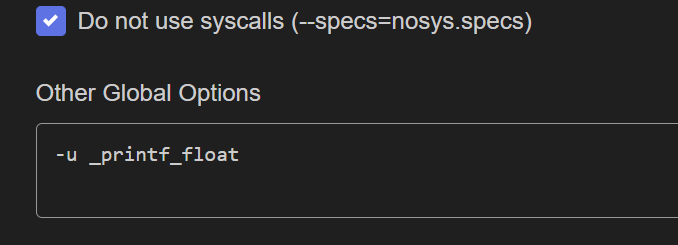
Other Global Options

--specs=nosys.specs --specs=nano.specs
选项 作用
​<span data-type="code">--specs=nosys.specs</span> 用**空桩函数**替代系统调用(_write/_read等),裸机必须加,否则链接报”undefined reference to _sbrk
​<span data-type="code">--specs=nano.specs</span> 使用 **newlib-nano**,精简版 C 库,printf 体积大幅减小,嵌入式推荐

⚠️ –specs=nano.specs带来的问题

​<span data-type="code">--specs=nano.specs</span> 下的 printf **默认不支持 %f 浮点格式化**,如果你的日志里有打印浮点数,需要加:

-u _printf_float

否则浮点日志会输出空或乱码


编译选项 –specs=nano.specs /newlib-nano的影响

--specs=nano.specs (newlib-nano) 的影响


1. printf / sprintf 格式化限制

格式符 默认nano -u _printf_float
%d %x %s ✅ 正常 ✅ 正常
%f %e %g ❌ 输出空/乱码 ✅ 正常
%lld (64位整数) ❌ 不支持 ❌ 需另加 -u _printf_long_long

2. 堆内存相关

  • malloc / free 使用的是精简版分配器
  • 没有线程安全保护(裸机无所谓,FreeRTOS下需注意)
  • _sbrk 需要你自己实现,否则 malloc 会 HardFault

3. 本地化 / 宽字符

  • 不支持 wprintf / wchar_t 相关函数
  • setlocale() 无效,中文字符处理受限

4. 文件 I/O

  • fopen / fread 等是空桩(配合 nosys.specs
  • 需要自己实现 _write / _read 才能让 printf 输出到串口

5. 数学库

  • libm 体积同样缩减,部分精度受影响
  • 建议显式链接:-lm

⚠️ 最容易踩的坑,嵌入式中一定要自己重定向输出函数

/* [ARMCC] retarget the C library printf function to the USART */
int fputc(int ch, FILE *f)
{
    USART_Data_Send(USART2, (uint8_t)ch);
    while (USART_Flag_Status_Get(USART2, USART_FLAG_TXDE) == RESET)
        ;
    return (ch);
}

/* [GCC] retarget the C library printf function to the USART */
int _write(int file, char *data, int len)
{
    // if ((file != STDOUT_FILENO) && (file != STDERR_FILENO))
    // {
    //     errno = EBADF;
    //     return -1;
    // }
    for (int i = 0; i < len; i++) {
        USART_Data_Send(USART2, data[i]);
        while (USART_Flag_Status_Get(USART2, USART_FLAG_TXDE) == RESET)
            ;
    }
    return 0;
}

如果 _write 没有实现或者实现有误,printf 调用会静默丢弃所有输出

MCU中如何将字符串指定到确定的链接地址


MCU中如何将字符串指定到确定的链接地址

要把某个字符串(常量)放到固定地址,推荐用“自定义段 + 链接脚本/散装文件固定该段地址”。不要只写一个固定地址指针(那样地址处的数据不会被链接器自动放进去,除非你另外烧录)。

下面分别给 GCC(ld)ARMCC(AC5 scatter) 的做法。


方案 A(推荐):放到固定 Flash 地址(由链接器保证)

1) C 里把字符串放到自定义 section

// 放在任意 .c 文件里
__attribute__((section(".fixed_str"), used))
const char g_fixed_str[] = "POWER_BOARD_APP:1.2.3";

used/KEEP 是为了防止链接优化把它丢掉。

2) GCC:在 .ld 里把该 section 固定到地址

在你的链接脚本里加一段(地址换成你要的,比如 Flash 尾部):

/* 例:固定到 0x0800FC00(请确认没和别的段冲突) */
.fixed_str 0x0800FC00 :
{
  KEEP(*(.fixed_str))
} > FLASH

方案 B:ARMCC(AC5) 用 scatter 文件固定地址

1) C 里同样放到指定 section 名

__attribute__((section("FIXED_STR"), used))
const char g_fixed_str[] = "POWER_BOARD_APP:1.2.3";

2) 在 .sct(scatter)里创建一个固定地址的执行区放它

示例结构(你需要把它合并到现有 scatter 中,地址/大小按需调整):

; 在 scatter 文件里新增一个执行区,把 FIXED_STR 放进去
LR_IROM1 0x08000000 0x00010000  {
  ER_IROM1 0x08000000 0x0000FC00  {  ; 先放常规 RO
    * (+RO)
  }
  ER_FIXED 0x0800FC00 0x00000400  {  ; 固定区域
    *(FIXED_STR)
  }
}

方案 C(仅“读取固定地址”):固定地址指针(不负责放置数据)

如果你只是想读取某固定地址已有的字符串(比如出厂信息区),可以:

#define FIXED_STR_ADDR (0x0800FC00u)
const char * const g_fixed_str_ptr = (const char *)FIXED_STR_ADDR;

注意:这不会把 “…” 放进该地址;该地址内容必须已被你单独烧录或由其他镜像生成。


关键注意点

  • 固定地址必须在有效的 Flash/RAM 范围内,且不与 .text/.rodata/.data/.bss 等重叠。

  • 常量字符串通常放 Flash(RO);放 RAM 需要另外做段和初始化策略。


printf重定向方法

嵌入式开发中串口是调试的常用方式,printf​作为调试最常用的方式是需要重定向的,不同的编译器有不同的重定向方式。


1、GCC开发环境

#if !defined(__CROSSWORKS_ARM) && defined(__GNUC__)

#include 
#include 

int _close(int file);
void _exit(int status);
int _fstat(int file, struct stat *st);
int _getpid(void);
int _isatty(int file);
int _kill(int pid, int sig);
int _lseek(int file, int ptr, int dir);
int _read(int file, char *ptr, int len);
int _write(int file, const char *ptr, int len);

/**************************************************************************//**
* Close a file.
*
* @param[in] file File you want to close.
*
* @return Returns 0 when the file is closed.
*****************************************************************************/
int _close(int file)
{
  (void) file;
  return 0;
}

/**************************************************************************//**
* Exit the program.
*
* @param[in] status The value to return to the parent process as the
* exit status (not used).
*****************************************************************************/
void _exit(int status)
{
  (void) status;
  while (1) {
  } // Hang here forever...
}

/**************************************************************************//**
* Status of an open file.
*
* @param[in] file Check status for this file.
*
* @param[in] st Status information.
*
* @return Returns 0 when st_mode is set to character special.
*****************************************************************************/
int _fstat(int file, struct stat *st)
{
  (void) file;
  st->st_mode = S_IFCHR;
  return 0;
}

/**************************************************************************//**
* Get process ID.
*
* @return Return 1 when not implemented.
*****************************************************************************/
int _getpid(void)
{
  return 1;
}

/**************************************************************************//**
* Query whether output stream is a terminal.
*
* @param[in] file Descriptor for the file.
*
* @return Returns 1 when query is done.
*****************************************************************************/
int _isatty(int file)
{
  (void) file;
  return 1;
}

/**************************************************************************//**
* Send signal to process.
*
* @param[in] pid Process id (not used).
*
* @param[in] sig Signal to send (not used).
*****************************************************************************/
int _kill(int pid, int sig)
{
  (void)pid;
  (void)sig;
  return -1;
}

/**************************************************************************//**
* Set position in a file.
*
* @param[in] file Descriptor for the file.
*
* @param[in] ptr Poiter to the argument offset.
*
* @param[in] dir Directory whence.
*
* @return Returns 0 when position is set.
*****************************************************************************/
int _lseek(int file, int ptr, int dir)
{
  (void) file;
  (void) ptr;
  (void) dir;
  return 0;
}

/**************************************************************************//**
* Read from a file.
*
* @param[in] file Descriptor for the file you want to read from.
*
* @param[in] ptr Pointer to the chacaters that are beeing read.
*
* @param[in] len Number of characters to be read.
*
* @return Number of characters that have been read.
*****************************************************************************/
int _read(int file, char *ptr, int len)
{
  (void)file;

  return readBuffer(ptr, len);
}

/**************************************************************************//**
* Write to a file.
*
* @param[in] file Descriptor for the file you want to write to.
*
* @param[in] ptr Pointer to the text you want to write
*
* @param[in] len Number of characters to be written.
*
* @return Number of characters that have been written.
*****************************************************************************/
int _write(int file, const char *ptr, int len)
{
  (void)file;

  return writeBuffer(ptr, len);
}

#endif /* !defined( __CROSSWORKS_ARM ) && defined( __GNUC__ ) */

在自己的程序中,只需实现:

int writeBuffer(char *ch, int length);
int readBuffer(char *ch, int length);

2、keil开发环境

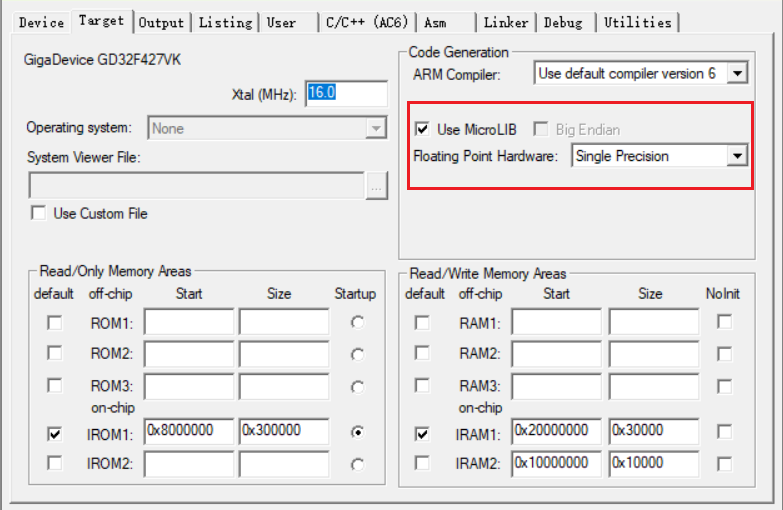
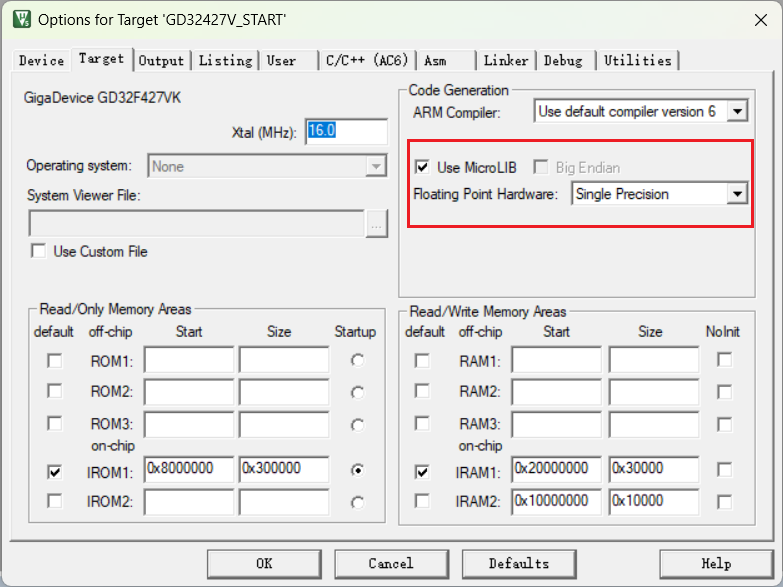
2.1、使用MicroLib

在代码中实现fputc​函数

// 重定向printf
int fputc(int ch, FILE *f){
  HAL_UART_Transmit(&huart1, (uint8_t *)&ch, 1, 1000); 
  return ch;
}

// 重定向getchar
int fgetc(FILE *f)
{
  int ch;
  while (__HAL_UART_GET_FLAG(&huart1, UART_FLAG_RXNE) == RESET);
  HAL_UART_Receive(&huart1, (uint8_t *)&ch, 1, 0xFFFF);
  return (ch);
}

2.2、使用非半主机模式

新建syscalls.c

#if defined(__CC_ARM)
/******************************************************************************/
/* RETARGET.C: 'Retarget' layer for target-dependent low-level functions */
/******************************************************************************/
/* This file is part of the uVision/ARM development tools. */
/* Copyright (c) 2005-2006 Keil Software. All rights reserved. */
/* This software may only be used under the terms of a valid, current, */
/* end user licence from KEIL for a compatible version of KEIL software */
/* development tools. Nothing else gives you the right to use this software. */
/******************************************************************************/

#include 

#pragma import(__use_no_semihosting_swi)

struct __FILE{
  int handle;
};

//Standard output stream
FILE __stdout;

/**************************************************************************//**
* Writes character to file
*
* @param[in] f File
*
* @param[in] ch Character
*
* @return Written character
*****************************************************************************/
int fputc(int ch, FILE *f)
{
  return putChar(ch);
}

/**************************************************************************//**
* Reads character from file
*
* @param[in] f File
*
* @return Character
*****************************************************************************/
int fgetc(FILE *f)
{
return getChar();
}

/**************************************************************************//**
* Tests the error indicator for the stream pointed to by file
*
* @param[in] f File
*
* @return Returns non-zero if it is set
*****************************************************************************/
int ferror(FILE *f)
{
  // Your implementation of ferror
  return EOF;
}

/**************************************************************************//**
* Writes a character to the console
*
* @param[in] ch Input character
*****************************************************************************/
void _ttywrch(int ch)
{
  putChar(ch);
}

/**************************************************************************//**
* Library exit function. This function is called if stack overflow occurs.
*
* @param[in] return_code Return code
*****************************************************************************/
void _sys_exit(int return_code)
{
  label: goto label; // endless loop
}

#endif /* defined( __CC_ARM ) */

Arduino与树莓派字节对齐问题记录

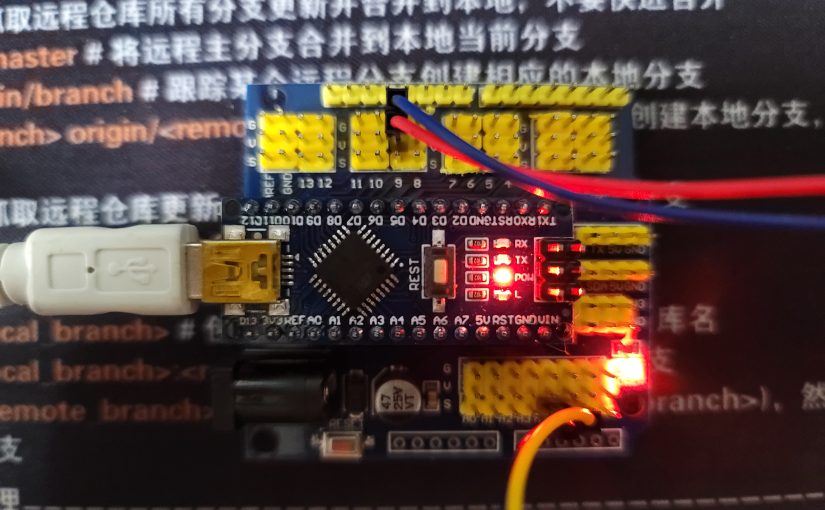
我在做一个小东西的时候用到了Arduino和树莓派,因为需要将数据采集端放的比较远所以没有直接将传感器接在树莓派上,而是选择了使用Arduino采集传感器数据,然后使用串口与树莓派通信。就在我很快写完两端的代码之后遇到了一个奇怪的问题,那就是明明数据接收解析过程没有问题,但是解析的数据怎么也不对。经过分析发现是两个平台数据长度和默认的对齐方式不同导致的,特此记录一下。

struct sensor_data{
    uint16_t hand;
    double ambient_temp;
    double object_temp;
    uint16_t tail;
}sensor_data;

我在两个平台定义了相同的结构体用来传输数据,在Arduino上将传感器数据获取到之后写入结构体,然后使用按字节从串口发送,因为两个平台都是小端模式,所以理论上在树莓派上我只需要按字节把接收的数据拷贝到相同结构体就可以获取到数据,但是,实际发现Arduino只发送了14字节,也就是说在Arduino平台下double只占用了4字节,与float是一致的。而且是按2字节对齐。

A5 5A D0 A3 E2 41 30 5C E1 41 0F F0

实际打印的数据也印证了我的猜想,后来发现Arduino的文档中关于double的描述明确指出了这个问题。

文档中关于double的说明

树莓派自然是不存在double与float长度一致的问题,而且树莓派是4字节对齐,所以就会出现我遇到的数据错误的问题。知道问题所在,修改代码就愉快的解决问题了。

关于C语言中的字节对齐一般有两种方式:

一、强制按字节对齐:

#pragma pack (n)    //C编译器将按照n个字节对齐。
#pragma pack ()     //取消自定义字节对齐方式。

二、对齐到n字节自然边界上。如果结构中有成员的长度大于n,则按照最大成员的长度来对齐:

__attribute((aligned (n)))  //C编译器将按照n个字节对齐。
__attribute ((packed))      //取消自定义字节对齐方式。

最后附上此次测试的代码:

树莓派:

#include <stdio.h>
#include <string.h>
#include <stdint.h>
#include <wiringPi.h>
#include <wiringSerial.h>

#pragma pack (2)
struct sensor_data{
    uint16_t hand;
    uint16_t serial_number;
    float ambient_temp;
    float object_temp;
    uint16_t tail;
}sensor_data;
#pragma pack ()

struct sensor_data rx_data;

int main(void)
{
    int hs1;
    char uart_rx_buffer[64];
    uint16_t uart_flag = 0;
    int16_t index = 0;
    int16_t data_flag = 0;
    wiringPiSetup();                            // 使用wiring编码去初始化GPIO序号
    // hs1 = serialOpen("/dev/ttyS0", 115200);     // 打开 /dev/ttyS0 串口设备,波特率115200
    hs1 = serialOpen("/dev/ttyUSB0", 115200); // 打开 /dev/ttyUSB0 串口设备,波特率115200
    if(hs1 < 0){
        printf("UART open error %d!\r\n",hs1);
        return -1;
    }
    else{
        printf("UART open success %d!\r\n",hs1);
    }

    char keyboard_input[10] = {};
    while(TRUE){

        int buffer_size = serialDataAvail(hs1);
        while(buffer_size){
            char c = serialGetchar(hs1);    // 从接收缓存区读取一个字节
            if((uart_flag == 0)&&(c == 0xA5)){
                uart_flag = 1;
            }
            else if((uart_flag == 1)&&(c == 0x5A)){
                uart_flag = 2;
            }
            else if((uart_flag == 1)&&(c != 0x5A)){
                uart_flag = 0;
                index = 0;
                memset(uart_rx_buffer,0,sizeof(uart_rx_buffer));
            }

            if(uart_flag > 0){
                uart_rx_buffer[index++] = c;
                if(index > sizeof(rx_data)+1){
                    uart_flag = 0;
                    index = 0;
                    memset(uart_rx_buffer,0,sizeof(uart_rx_buffer));
                }
            }

            if((uart_flag == 2)&&(c == 0x0F)){
                uart_flag = 3;
            }
            else if((uart_flag == 3)&&(c == 0xF0)){
                data_flag = 1;
                memcpy((&rx_data),uart_rx_buffer,sizeof(rx_data));
                uart_flag = 0;
                index = 0;
                memset(uart_rx_buffer,0,sizeof(uart_rx_buffer));
            }
            else if((uart_flag == 3)&&(c != 0xF0)){
                uart_flag = 0;
                index = 0;
                memset(uart_rx_buffer,0,sizeof(uart_rx_buffer));
            }
            buffer_size --;
        }

        if(data_flag){
            printf("%5d Ambient = %5.2f   Object = %5.2f\r\n",\
                  rx_data.serial_number,\
                  rx_data.ambient_temp,\
                  rx_data.object_temp);
            data_flag = 0;
        }
    }

    serialClose(hs1);                           // 关闭串口
    return 0;
}

因为使用到了wiringPi的库,所以编译的时候记得加-lwiringPi链接,执行的时候也需要使用管理员权限才可执行。

Arduino:

#include <Wire.h>
#include <Adafruit_MLX90614.h>

Adafruit_MLX90614 mlx = Adafruit_MLX90614();

struct sensor_data{
  uint16_t hand;
  uint16_t serial_number;
  float ambient_temp;
  float object_temp;
  uint16_t tail;
}sensor_data;

struct sensor_data tx_data;
uint16_t num =0;

void setup() {
  tx_data.hand = 0x5aa5;
  tx_data.tail = 0xf00f;
  Serial.begin(115200);
  mlx.begin();  
}

void loop() {
  tx_data.serial_number = num;
  tx_data.ambient_temp = mlx.readAmbientTempC();
  tx_data.object_temp = mlx.readObjectTempC();
  Serial.write((char*)(&tx_data),sizeof(tx_data));
  num++;
  delay(500);
}